Main Idea and Details Worksheets Generator
Paragraphs with main idea, title, detail and topic-sentence questions – print a new sheet with answers anytime.
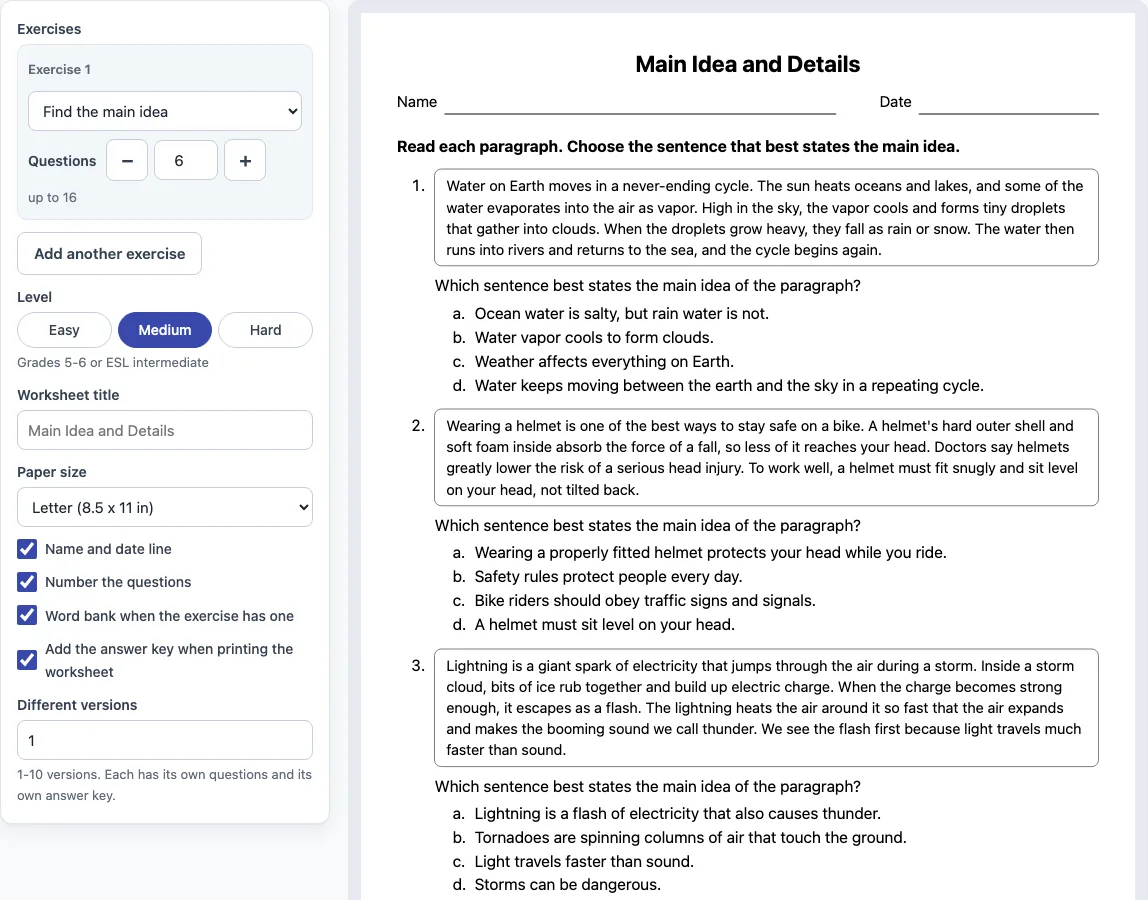
How to make a main idea worksheet
- Choose a level: Easy, Medium or Hard. The level changes the paragraphs the questions use.
- Set the number of exercises. Start with the default, then select “Add another exercise” for up to six exercises.
- For each exercise, pick an exercise type: Find the main idea, Choose the best title, Find a supporting detail, or Find the topic sentence.
- Set the number of questions for each exercise: up to 16 paragraphs per level, or 10 for Find the topic sentence.
- Mix exercise types on one sheet, for example Find the main idea followed by Choose the best title.
- Type a worksheet title and choose US Letter or A4 paper.
- Turn on Name and date line or Number the questions if you want them.
- Turn on Add the answer key when printing if you need a key.
- Check the preview, then select “Print worksheet” to print the sheet, or “Print answer key” to print only the key.
Select “New worksheet” to get new questions with the same settings. Turn on “Different versions” (1 to 10) to give each student a different set of questions, each with its own answer key. Select “Copy link” to save an address that reopens exactly the same worksheet, which is useful for reprinting later or sharing with a colleague. To save a PDF, choose Save as PDF in the print window.
What is the main idea of a paragraph and how do you find it?
The main idea is what the whole paragraph is mostly about, written as one complete sentence. To find it, ask yourself what most of the sentences are describing, then check whether a sentence states that point directly. That sentence is often the topic sentence, which is usually the first or last sentence.
Test each answer choice against the paragraph. A choice that is too broad covers far more than the paragraph discusses. A choice that is too narrow names one small detail. A choice about something the paragraph never mentions is wrong. In a paragraph about seeds, “Plants are living things” is too broad, “A root grows down into the soil” is a single detail, and “Farmers plant corn in the spring” is not in the paragraph. The right choice, “Seeds need certain things before they can become plants,” fits everything the paragraph says. “Find the main idea” always uses these three kinds of wrong choices, so learners get practice spotting them.
What is the difference between the main idea and supporting details?
The main idea is the big point. Supporting details are the facts or examples that explain or prove it. In the seed paragraph, “First, it takes in water” and “Warmth and air help it too” are supporting details because each one shows what a seed needs.
A supporting detail must be stated in the paragraph and must support the main idea. A detail that is interesting but off topic does not count, even if it is true. When you practice with “Find a supporting detail,” read the main idea first, then look for the sentence that gives a reason, fact or example for it.
You may use what you make at home, in class, in tutoring and in paid lessons; just do not resell the sheets as a product.
Frequently asked questions
Do the main idea worksheets come with answers?
Yes. Turn on “Add the answer key when printing” and the key prints on its own page. “Print answer key” prints only the key, and each version in Different versions has its own key. “Practice online” also marks each answer right or wrong and shows the correct answer.
Can I get the worksheet as a PDF?
Yes. Select “Print worksheet,” then choose “Save as PDF” in the print window. Set the scale to 100 % and turn off headers and footers before saving.
Can I use these worksheets in paid lessons or sell them?
You can use them free at home, at school, in tutoring and in paid lessons, and you can copy them for your learners. You cannot resell them as a stand-alone product, such as a printable pack, a workbook or a download, because the terms of use do not allow it.
What is a topic sentence?
A topic sentence states the main idea of a paragraph, usually as the first or last sentence. Not every paragraph has one. The “Find the topic sentence” exercise uses only paragraphs that have a clear topic sentence.
Do I need to sign up or install anything?
No. The generator runs in your web browser, it is free, and nothing you make is uploaded or sent to a server.
What grade levels do the worksheets suit?
Easy is for grades 3 to 4 or ESL beginners, Medium is for grades 5 to 6 or ESL intermediate learners, and Hard is for grades 7 to 8 or ESL upper-intermediate learners.
Related tools
- Inference worksheets: Use these when learners need to work out what a text implies but does not state.
- Context clues worksheets: Use these when learners need to figure out a word’s meaning from the sentences around it.
- Sentence structure worksheets: Use these when learners are building or identifying complete sentences and phrases.
- Vocabulary worksheets: Use these when the focus is on learning and using new words.
- Similes and metaphors worksheets: Use these when learners are comparing ideas through figurative language.
- Grammar worksheets: Use these when the focus is on grammar rules and usage.