Vocabulary Quiz Maker
Type or paste your own words and definitions, and this vocabulary quiz maker builds a printable quiz with an answer key. You can also start from one of seven sample lists.
Recent
Your last 10 settings, saved only in this browser. Nothing is uploaded.
How to make a vocabulary quiz
- Type or paste your words into the Your words box, one per line, as
word - definition. A colon or a tab also works. - Add an optional example sentence after a vertical bar, such as
habitat - the place where an animal lives | A forest is a habitat for deer.The Complete the sentences question type uses that sentence with the word blanked out. - Or choose one of the seven sample lists and edit it. If the box is empty or unreadable, a sample list is used and a note says so.
- Check the spelling of every word and definition before you print, because they are used exactly as typed.
- Change the sections if you like. A quiz holds up to six; for each one, choose a question type and a number of questions from 3 to 30.
- Pick a level. Easy gives three choices in each multiple-choice question; Medium and Hard give four.
- Type a title, then choose whether to number the questions and show a word bank. The sheet has a name and date line and a Score line that counts every gradable point. Press New worksheet to redraw the questions with the same settings.
- Print the quiz with the answer key (tick the answer key option or use Print answer key) and pick US Letter or A4. Use Different versions (1 to 10) for separate versions, Practice online for an on-screen quiz, or Copy link to save an address that reopens the quiz.
How can I create a free vocabulary quiz?
You can make one here by typing your own words and definitions into the Your words box, one pair per line. The quiz is built from that list, so there is no account to open and nothing to install. If your words are in a spreadsheet with the word in one column and the definition in the next, copy both columns and paste them, because a tab works as the separator. Add an example sentence after a vertical bar when you want the Complete the sentences type. Set the sections, print the sheet with its answer key, or use Practice online for an on-screen version.
Which question types should I use?
Mix several types so learners meet each word in more than one way. Choose the definition and Choose the word are multiple choice, and their wrong options come from your own list, so every option is a word the class has studied. True or false uses statements where about half are true; the false ones pair a word with the real meaning of a different word from your list. Write the word for the definition gives a word bank, Unscramble the word mixes up the letters so they never keep the original order, and the meaning is shown as a clue. Match words and definitions uses groups of four pairs. Complete the sentences blanks out the word in your example sentence, and if the sentence uses an -s, -ed or -ing form, the base word appears in parentheses as a hint. Alphabetical order asks learners to number groups of words in ABC order. Use it in a sentence is open writing and is never scored.
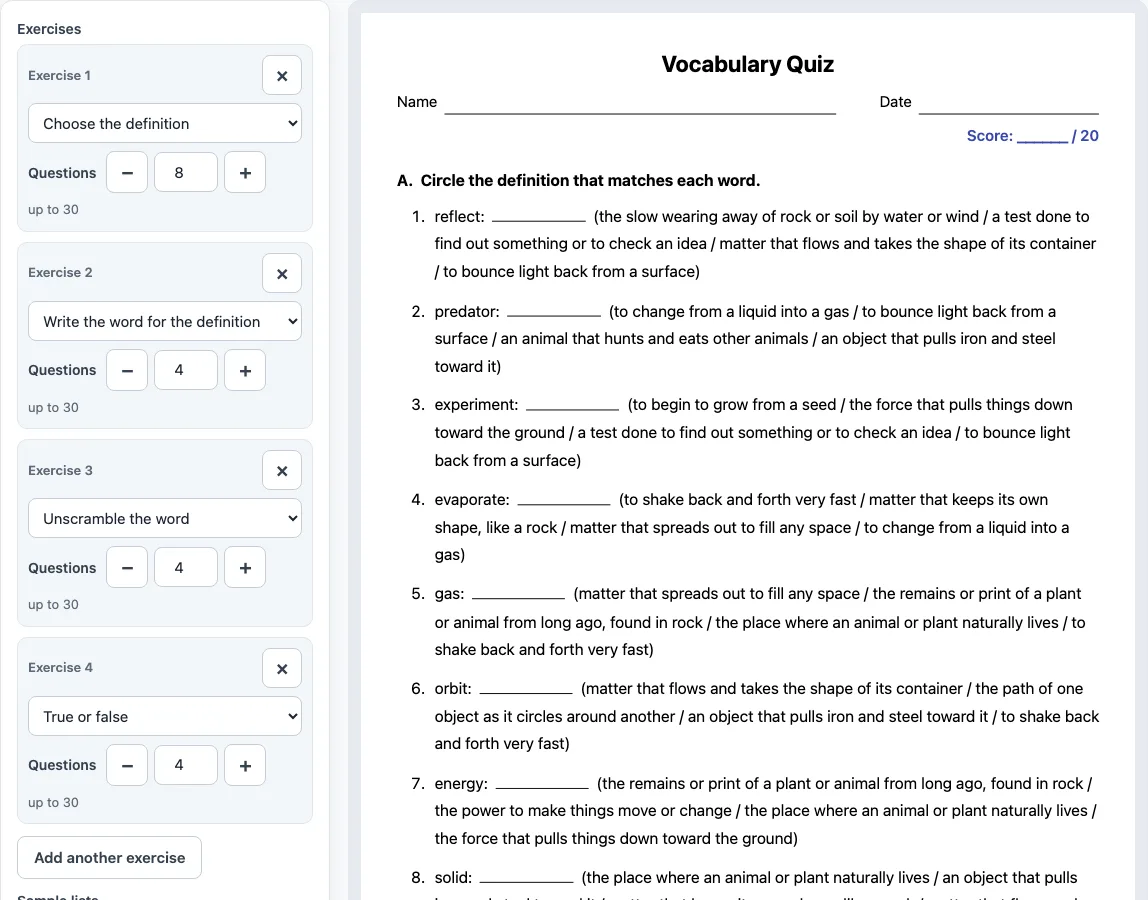
The quiz that opens on this page has 20 points: 8 questions choosing the definition, 4 writing the word from a word bank, 4 unscrambling words and 4 true or false statements.
What is the best game to build vocabulary?
This tool does not make a game; Practice online is a quiz. For general classroom practice, a useful pattern is short quizzes repeated over time on a small set of new words, about 10 to 15 per week, with a mix of question types.
Can ChatGPT create a vocabulary quiz?
Chatbots can write quiz questions, but this tool does not use AI. It builds the quiz by code straight from the word list you type, so the definitions are the ones you typed and the same link always makes the same quiz. That also means a wrong definition in your list becomes a wrong answer on the sheet, so check every line before you print. If you use a chatbot to draft words or sentences, paste the final list here and check it yourself.
Frequently asked questions
Is this vocabulary quiz maker free, and do I need to sign up?
Yes. The tool is free, needs no sign-up, and runs in your browser. Your word list is not uploaded.
Can you give me a vocabulary quiz without typing my own words?
Yes. Choose one of the seven sample lists (Grade 3 science, Weather, Feelings, Academic words grade 6, ESL food, ESL jobs and ESL places in town), each with 15 to 20 words. You can edit a sample before you print.
Can students take the quiz on screen?
Yes. Practice online turns the sheet into an on-screen quiz. Learners choose, type or tap an answer, press Check answers to see the results and score, and press Try again. Open writing items are not scored.
How is the score counted?
The Score line counts every gradable point, and the quiz that opens on this page totals 20. Each matched pair counts as one point. Use it in a sentence is open writing and is not counted.
Can I make different versions for a class?
Yes. Set Different versions from 1 to 10 to create separate versions with different questions, and each version has its own answer key.
Can I use the quizzes commercially?
Yes. The quizzes are free for classroom and commercial use, including Teachers Pay Teachers, Etsy and KDP, and no credit is needed. You may not copy the generator itself as a competing tool.
Related tools
- Vocabulary worksheets: the full worksheet builder with the same word-list box, for practice instead of a quiz.
- Synonyms and antonyms worksheets: use when learners need to match words by meaning or by opposite meaning.
- Context clues worksheets: use when learners should work out a word’s meaning from the sentence around it.
- Idioms worksheets: use when your list includes phrases whose meaning is not the sum of their words.
- Homophones worksheets: use when words sound alike but are spelled differently.
- Tone words: a tone words list with a quiz, for reading and writing lessons.
- All vocabulary tools: the full set of vocabulary tools in one place.